Stupid simple interrupt-driver IR remote decoder for ATtiny/ATmega
Quick one. For a project, I needed a really simple IR decoder program for an ATtiny85 that (a) Used interrupts for pulse processing, but (b) didn't use a timer interrupt, and (c) worked with an apple remote I had laying around. None of the libraries I found did this (mostly b, plus none really had the 85 in mind), so I whipped up my own. It's stupid. It's simple. It works well enough for me. Just whack your IR decoder's output to the 85's physical pin 3, hook a 9600,8,n,1 uart input to physical pin 2, press buttons on your remote, and marvel at the numbers and stuff appearing on your screen. Enough blab, here's the goods. This should work fine with pretty much any AVR, as long as you fix up the interrupt configuration in setup() for your particular chip.

This work is licensed under a Creative Commons Attribution-NonCommercial-ShareAlike 3.0 Unported License.
/* SuperSimpleIR - * Bare-minimum no-frills code to interpret input from an IR decoder, using pin change interrupts. * Does no fancy decoding - it's up to you to figure out which button corresponds with the * output from this snippet. The provided message codes work with an Apple remote, but this is by * no means limited to such remotes (for instance, my Yamaha receiver's remote works fine with this). * Possible improvements: * - Use a timer interrupt instead of timeToCommitMessage. I didn't bother * implementing this as the project I developed this for will need the timer for other tasks. * - The message commit code is (barely) vulnerable to concurrency issues if a pulse comes in while * we try to commit a message. In practice I don't think this matters. * - It gets confused easily if the signal gets weak and corrupted. */ // From the Tiny core. #include <TinyDebugSerial.h> TinyDebugSerial mySerial; // Pin defs. #define IN_IR 4 // If this is changed, change the code that enables interrupts. #define IR_MSG_PLUS 2011287570 #define IR_MSG_MINUS 2011279378 #define IR_MSG_REW 2011238418 #define IR_MSG_FFWD 2011291666 #define IR_MSG_PLAYPAUSE 2011242514 #define IR_MSG_MENU 2011250706 #define IR_MSG_REPEAT_LAST_BUTTON 0 // After this much time has elapsed after the last transition, consider the // message complete. #define MSG_COMMIT_TIME_MICROSEC 30000 enum IRProtocolState { Idle, Building }; unsigned long timeOfLastIRPinChange; // Time when the last pin change happened on the IR decoder. unsigned long timeToCommitMessage; // Time after which we should consider the message complete. unsigned long message; // Workspace where the message is built up. IRProtocolState irProtocolState; // What our protocol decoder is doing. void processIRMessage(long message); ISR(PCINT0_vect) { boolean isPinHigh = digitalRead(IN_IR); long currentTime = micros(); long microsSinceLastChange = (currentTime - timeOfLastIRPinChange); timeOfLastIRPinChange = currentTime; // Bump up the commit time, since we got a level change. timeToCommitMessage = MSG_COMMIT_TIME_MICROSEC + timeOfLastIRPinChange; if (!isPinHigh) { // Going low. if (microsSinceLastChange < 700) { // Space message = message << 1; } else if (microsSinceLastChange < 2000) { // Mark. message = message << 1; message |= 1; } else if (microsSinceLastChange < 20000) { // First LOW. message = 0; irProtocolState = Building; } } } void setup() { mySerial.begin(9600); mySerial.println("IR test up."); timeOfLastIRPinChange = micros(); timeToCommitMessage = -1; irProtocolState = Idle; GIMSK = _BV(PCIE); // Enable pin change interrupt PCMSK = _BV(PCINT4); // Enable the interrupt for only pin 4. } void loop() { // Check to see if we can commit a message. If so, process it. if (micros() >= timeToCommitMessage && irProtocolState == Building) { long localMessage = message; message = 0; irProtocolState = Idle; processIRMessage(localMessage); } } void processIRMessage(long message) { switch (message) { case IR_MSG_PLUS: mySerial.println("Plus"); break; case IR_MSG_MINUS: mySerial.println("Minus"); break; case IR_MSG_REW: mySerial.println("REW"); break; case IR_MSG_FFWD: mySerial.println("FFWD"); break; case IR_MSG_PLAYPAUSE: mySerial.println("Play/Pause"); break; case IR_MSG_MENU: mySerial.println("Menu"); break; case IR_MSG_REPEAT_LAST_BUTTON: mySerial.println("(repeat last)"); break; default: mySerial.print("Unknown code: "); mySerial.println(message); break; } }
Classic Mac -> PS2 mouse adapter
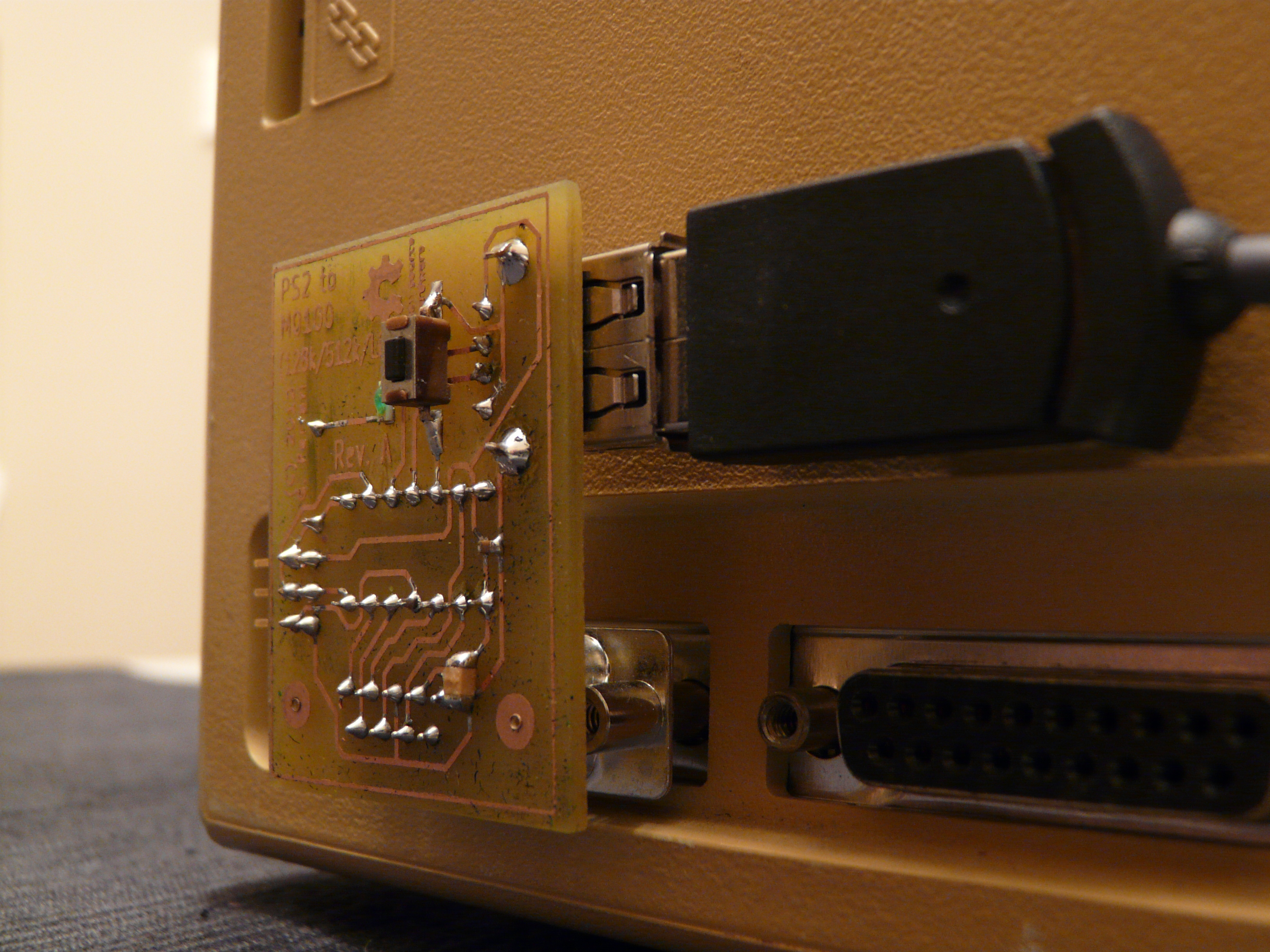
So I made a little adapter so I can connect PS/2 mice to the pre-ADB Classic Macs (128k, 512k, 512ke, probably Lisa). They use a really simple scheme: two pairs of quadrature inputs (one for X, one for Y), and one input for the single button. 5v is provided for the mouse. Perfect for a little microcontroller like the ATtiny to interface to (which is funny, because the ATtiny is capable of a far faster clock speed than the Macs...). Anyways here is the adapter, whipped up across a couple evenings:

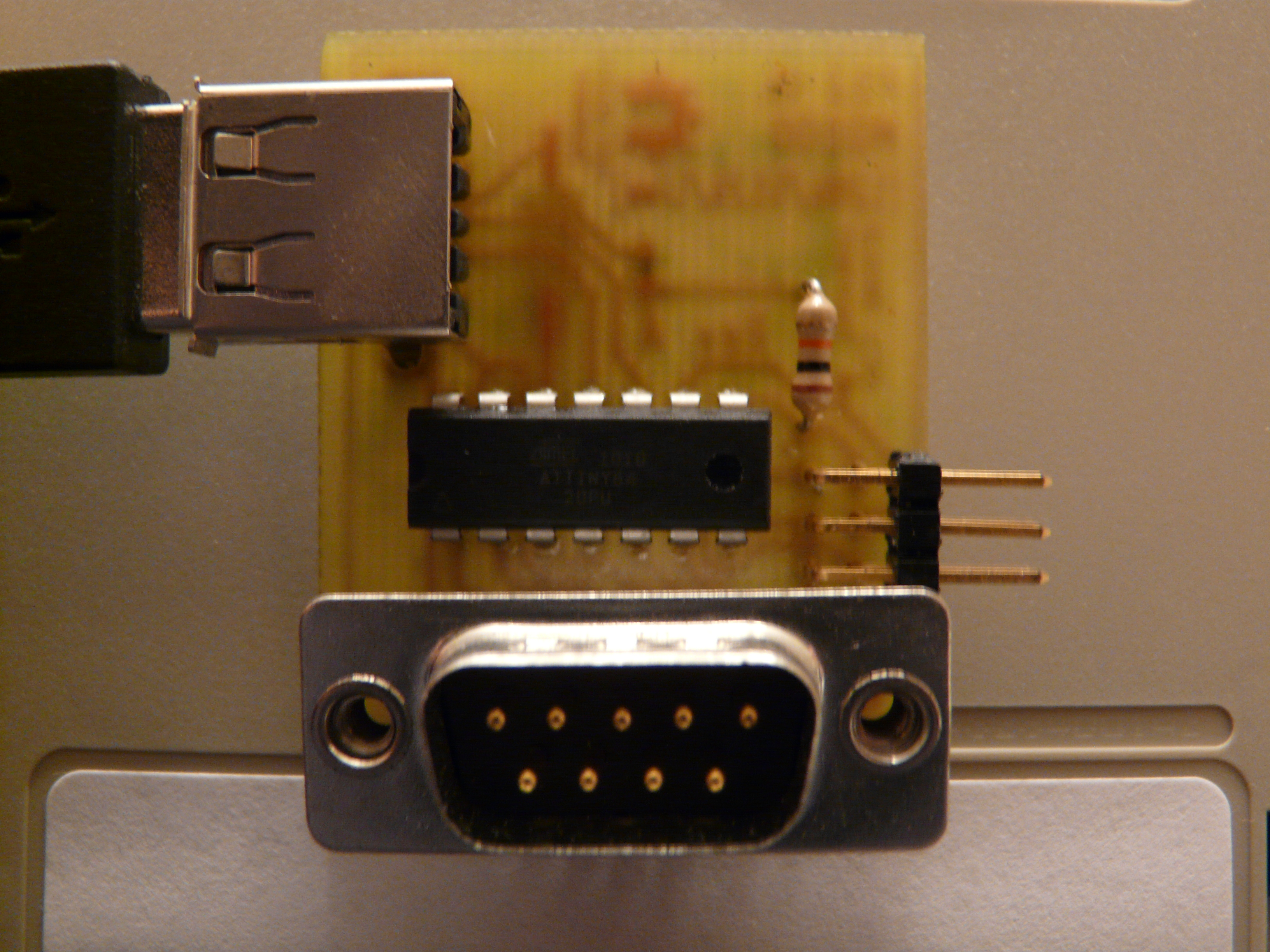
There isn't much to it, just an ATtiny84 and a couple connectors. The software is actually compatible with most AVRs, so you can use whatever AVR you have handy if you're willing to rework the PCB (they just need enough pins: 7 at bare minimum if you get rid of the status LED). You'll notice a USB plug in there. This thing does not speak USB, only mouse PS2. Thing is, most USB mice can act as PS2 devices (those little PS2->USB adapters are just wires). So instead of fiddling with adapters, I opted to directly use a USB plug. Beware though that some really modern mice don't speak PS2. If your mouse is worth less than $5, you're set
. Here's a view from the other side:

Youtube goodness:
I've made all the code/schematics/PCB layouts available as open-source hardware (TAPR Open Hardware License, www.tapr.org/OHL), so grab your copy here:
Mac2PS2.zip
Note! If you'd be interested in buying a kit or fully assembled product from me, drop me a line (YouTube comment would be best). If there's at least a little bit of demand, I'll set something up. It'll be cheap; I don't plan on making money from this
WS2801 LED Driver breakout
Just a quickie, companion to my bedroom lighting project video here: http://youtu.be/QDfqHmQUCMA
Here is the breakout board I made for this project (with the addition of a spot for a larger bypass cap, which I found necessary).
Download: WS2801_Breakout

WS2801 Breakount by Giacomo Ferrari is licensed under a Creative Commons Attribution-NonCommercial-ShareAlike 3.0 Unported License.
Based on a work at giferrari.net.
Strange Mac 512k RAM expansion by Calmos
So I picked up an old Mac 512k "fat mac" the other day. I was tearing it down for some maintenance, but encountered problems because a logic board was interfering with parts of the case. Turns out it was not a stock board - it was a 3d-party RAM expansion board:

You can watch my teardown here: Mac 512k restoration and bizarre 3d party hack
I can't find any info at all about it, other than the model (CD101D1-3). Even the manufacturer (Calmos) is a mystery. Is it GLaDOS' more mellow sister? Who knows. Edit: Jeff points out in the comments that Calmos was a chip manufacturer. The chip itself is a SCSI controller. Regardless, this thing is fascinating in its hackishness, so I'm writing up this post to share the strangeness and to see if anyone knows anything about this. Now, think "expansion card installation" for a moment. Thinking of card edge connectors? SIL headers, perhaps? Ribbon cables? All normal. Well, this thing is a bit more... hardcore. To install, you take some SIL pin headers, solder them directly onto the existing CPU's pins then press the expansion card onto those headers.
Here is the top of the board.
Normal stuff. Some SIMMs, some glue logic... and... WAIT.
Yes, this Frankenstein has its own 68k. Could it be disabling the Mac's 68k to replace it with this monstrosity? Who knows. There's also this extra 2x13 header on the board that goes out to an extra DB-25 on the back of the Mac (you can see it just to the right of the expansion board's 68k on the below picture). Absolutely no idea what that does. Edit: It's a SCSI port.
Anyway, here's some pics of the thing installed on the Mac's mainboard.
More glamour shots of various parts:
So, has anyone seen this thing before? Were they popular? It does seem to work - my 512k is reporting 2 megs of ram.
SOHA: Complete
So as it happens with these personal projects, I've finished the project but haven't finished updating the build log (yet). However I've uploaded a video to my YouTube channel that shows the final result. I'll post more as I get inspired
Fixing Altec “Show n Go” Retractible license plate holder
So my Altec Show'n'Go motorized plate holder broke. Brought it inside and searched a while for pictures of the underside of the device so I could see what was wrong. I found this thread. Look at the second pic in that post - see the pulley at the top of the device (covered by that square bit of metal)? Mine fell off. So I dug out a junk pulley and attached it using a screw instead of a pressed-in fastener. This means there's now a screw and a nut sticking out of the device, but that doesn't matter in my application because I mounted the holder so it juts out a bit from the bumper. I used a zip-tie to replace the square bit of metal I mentioned (presumably it's a guard to prevent the cable from falling off the pulley). Works well - the stiffness of the tie keeps it raised at just about the height of the pulley's groove. Adjust the cable tension using the nuts and enjoy. Hope this helps someone - I sure missed being 007 for a while
.
Flash Arduino sketches on the move via Zipit Z2
One thing I've found annoying with Arduinos is the relative lack of options when flashing sketches. A PC is pretty much required. Flashing in the field requires lugging around a laptop. I came up with a solution using the Zipit Z2 instant messenger client. It's a tiny device similar in form and size to one of those newer foldable GameBoy Advance handlelds. It's an interesting platform because of ability (Can run Debian Linux, has built-in WiFi), cost ($30), and battery life (around 5 hours). Unfortunately, it has no external serial port. Fortunately, it's easy to add. Just see this blog post by Geordy Rostad: Adding a Serial Port to the Zipit Z2. I did exactly what he did, except I omitted the level converter, connecting the serial lines directly to the new connector (such a converter would be superfluous when interfacing with an Arduino). Now, my Arduinos are generally at 5V, but the Zipit works with 3.3V. This isn't a problem with data going from the Z2 to the Arduino - 3.3V is plenty to drive the inputs of a 5V device. The other way around requires a voltage divider so we don't harm the Z2. Here's a quick schematic of my converter built into the cable:
As for the OS I used on the Zipit: z2sid. It's my distro of choice because it's Debian (meaning apt-get works!) and gcc works. To get avrdude (the flashing program), I just did apt-get install avrdude. I whipped up this little script so I don't have to type out the rather long avrdude commands:
avrdude -v -patmega328p -cstk500v1 -P/dev/ttyS2 -b57600 -D -Uflash:w:$1:i
Save that as flash.sh, chmod it +x, and use (./flash.sh my-sketch.hex). You might want to change the -patmega328p to whatever is appropriate for you. Note that the Z2 doesn't have a DTR line, meaning auto-reset won't work. You'll have to reset the Arduino manually, then run avrdude. Timing takes a bit of practice.
SOHA: Main board & test
Etched and populated the main amplifier board last night. Powered it on for the first time and... buzzzzzzzzz. Still sounded rather good with music in it. After a few hours of fussing around, I discovered it was my poor-quality temporary wiring input-side. Strange feedback loops and stuff. I'll be honest, analog circuits are still a dark art to me. Hopefully this project has helped dispel that
Anyways, now it's using shielded wire and... oh man. Let's just say this thing has broadened my musical horizons. I'll now listen to things on my playlist that I'd usually skip over - it's just such a pleasure to listen to this thing. Still some small noise when the music is stopped. I think that will go away once I finish up the wiring (still a bunch of unshielded sections). Even if it doesn't though, I'll be totally happy!
As for the design itself, I've got a bit more than a classic SOHA amp here (the VU meter stuff I talked about in my previous post). Unfortunately, I still haven't received all the parts for that (they're from Soviet Russia. Seriously.). So I'll hold off on posting the CAD designs and parts list until I know it all works. Here's some pics from the build, though.
SOHA: Power supply
The SOHA's power supply is quite simple. It's quite clever how it obtains the ~40 volt B+ for the tube - it basically stacks two full-bridge rectifiers, decoupling them with big caps. To make case layout and circuit debugging easier, I decided to put the power supply on its own board and use various salvaged connectors to hook up to the main amp board. The only mod I made to the original SOHA circuit was use a bigger transformer (1000 mA) to power some eye candy (and put a bigger heatsink on VR3 to handle the extra power). Oh, I also removed the power LED (I've got other plans). I much prefer surface-mount assembly to through-hole (no drilling a thousand little frickin' holes), so I found equivalent SMT parts to the recommended through-hole parts. Here are the part numbers I used for the power supply (refer to figure 4 on the HeadWize page here). Note the connectors are absent from this list - I have no idea what I used. A few years back, some jerk broke our dorm TV. Silver lining: it contained lots of sweet surface mount connectors!
| Reference | Description | Mouser Part |
|---|---|---|
| R9 | 2k2 1/8W | 71-SMM02040C2201FB30 |
| R10 | 1k3 1/8W | 71-SMM02040C2000FB30 |
| R11 | 11k 1/8W | 71-SMM02040C1801FB30 |
| C3-C6 | 100u 100V | 5985-AFK100V100-F |
| C7, C8, C11 | 47u 16V | 667-EEE-HDV470XAP |
| C9, C10, C12 | 470u 35V | 667-EEE-TKV471UAQ |
| BR1, BR2 | 100V 1A Bridge Rect. | 625-DF02S-E3 |
| VR1 | 12V 0.1A Positive | 511-L78L12ACU |
| VR2 | 12V 0.1A Negative | 511-L79L12ACU-TR |
| VR3 | 1.5A Neg Adj Vol Reg | 512-LM337T |
| D3, D4 | 1N4002 1A 100V GP | 583-FM4002 |
| T1 | 30.0V CT @ 0.83A | 553-VPT30-830 |
Laying this thing out was a bit of a pain due to those large caps. Also, the kicad library archive didn't have modules for most of these parts. Oh well. Here's what I came up with:
Here are some pics from the build:
I've uploaded a KiCad project containing a schematic and the board layout.

SOHA power supply board layout by Giacomo Ferrari is licensed under a Creative Commons Attribution-NonCommercial-ShareAlike 3.0 Unported License.
SOHA: PARTS!!
Parts! I love parts. I got a bunch of 'em in the mail for the headphone amp:
Transformers! The left one is for a VU meter I'm thinking of building (I'll write about it if it works), the right one is a 30VCT, 1000mA toroid for the SOHA itself (bigger than the classic SOHA's 400mA, since I'm adding some accessories that need power).